On any computer network, there exists a need for connected devices to identify themselves. There exist several options for that: IPv4, IPv6 and MAC Addressing. This post focuses on defining what IPv4 is and primarily aimed at the software side of someone needing to configure their Windows device. The image in the post is from a Windows 10 Device on a network and I’ll break down what each setting means and what IPv4 is in general.

IPv4 itself is 4 bytes long or (32-bits). The human readable form as seen in the above image is 4 numbers ranging from 0-255 with a period between each number. This period for the human readable form is on the byte boundary. For example in the address of 192.168.1.100, the first byte is 192, the second byte is set to 168, the third byte’s value is only just 1 and the final fourth byte value is 100. The equivalent form in a computer would be better written as binary which would look something like this: 11000000101010000000000101100100.
Another part of the IPv4 address is the subnet mask. The subnet mask is binary ANDed into the given address to get the network part of the address and take off the device part of the address when in use. If multiple devices are on the same network address, they should be able to communicate which each other. The 255.255.255.0 (for binary users 11111111.11111111.11111111.00000000) would be bitwise ANDed with the given IPv4 address to separate the network address part from the device IP part. To bitwise AND, one would need to go thru on bit at a time and set the results number to 1 if the original number and the mask part are 1. If either (or both) are 0, one would set the results number to zero. Luckily, the 255.255.255.0 address is very easy to use due to being on a byte boundary and all or nothing approach. This mask means we take the first 3 bytes and the network mask – 192.168.1 and for the fourth byte, set to zero. Now let us put it all together. For the IPv4 address of 192.168.1.100 mask 255.255.255.0, the device in question would be in a 192.168.1.0 network. Being on the same network means devices can talk to each other. The device IP itself is still 192.168.1.100.
The default gateway IP is typically going to be the router in the LAN. For someone at home, this is likely the router provided by their IP and is sandwiched between their devices and the IP provider infrastructure. It is functionally the root of the home LAN. When a device on the LAN does not know where to send a network related bit of information, it sends said information to the router to let the router figure it out. The letters DNS are short for Domain Name System. It is this system that translates web site addresses such as reddit.com between “reddit.com” and a machine understandable IP address. Should a DNS server go down or the machine be set to use a nonexistent one, this translation won’t work. Typing the IP address directly still may work. I’m included an example below of asking for the IP for “reddit.com” from Google’s DNS server. The IPv4 addresses such as 151.101.129.140 are easy enough to read. Let me point out the characters “2a04:4e42:200::396.” That’s in IPv6 address. That addressing style was created due to some limits encountered for IPv4. It is much larger than an IPv4 address -specifically 16 bytes rather than the 4 bytes of an IPv4 sized address.
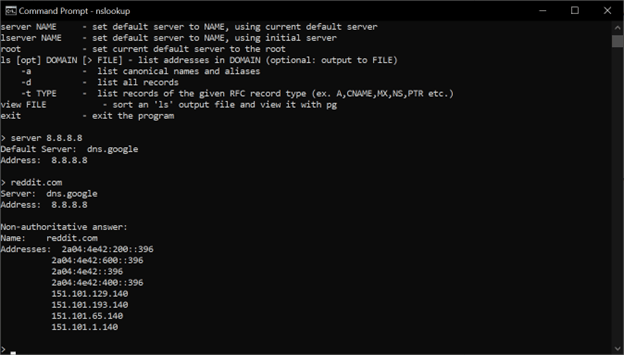
Without a router or similar device playing a role, the home LAN devices aren’t going to be seeing the internet any may have trouble talking to each other. I’m not counting it has as impossibility (peer to peer direct connections for example) but having a router in an LAN is very useful.
For an IPv4 based network, it is very important that each device on a same network has a unique IP. One likely will have trouble if two devices has the same IP. The equivalent would be having an address of 555 E Example Street for 2 separate houses in a neighborhood. When the mail deliverer comes with a letter addressed to 555 E Example Street, which house would get the letter?
This Post does leave out the different IPv4 Address class types, what public vs private IPv4 addresses are and only briefly touched on the network mask. There are plans for showing how to subnet in IPv4 and what does that mean.
Links Of Interest for additional reading.

 IT Lessons Learn
Leave a reply to IPv4 Subnetting Series Part 1: Beginner’s Binary Bonanza – IT Lessons Learn Cancel reply